# Forensic

* ## Taking Up Residence

  <figure><img src="https://906050983-files.gitbook.io/~/files/v0/b/gitbook-x-prod.appspot.com/o/spaces%2FNUYCtlc0k8qWwmB2FmiA%2Fuploads%2F1UZ5WnGPiLmQ0tzbbcfm%2Fimage.png?alt=media&#x26;token=faa4feed-a5b4-49aa-b91b-5d740f0aad75" alt=""><figcaption></figcaption></figure>

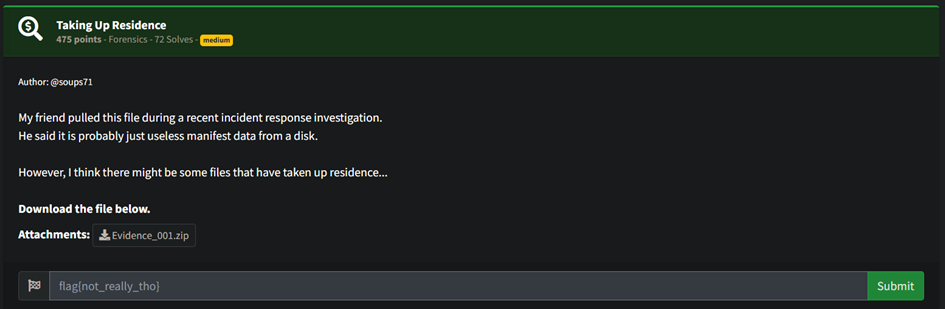
Another CTF another forensic challenge solved. For this challenge given the file that I have no idea what this file for which I do some research by looking at the file header starting with "`FILE0`", I discovered that the file provided was indeed a MFT (Master File Table) file. MFT file mainly consist of a files entry each times file gets added to NTFS file system volume. More information about the MFT file [here](https://learn.microsoft.com/en-us/windows/win32/fileio/master-file-table).

<figure><img src="https://906050983-files.gitbook.io/~/files/v0/b/gitbook-x-prod.appspot.com/o/spaces%2FNUYCtlc0k8qWwmB2FmiA%2Fuploads%2Flx3QuXFUMr0BKIpgO25i%2Fimage.png?alt=media&#x26;token=e78f656a-c220-46ea-a530-e489649230f4" alt="" width="545"><figcaption></figcaption></figure>

<figure><img src="https://906050983-files.gitbook.io/~/files/v0/b/gitbook-x-prod.appspot.com/o/spaces%2FNUYCtlc0k8qWwmB2FmiA%2Fuploads%2Fv8U7npApbBzxO3ARKxVg%2Fimage.png?alt=media&#x26;token=94868403-7c8b-431a-972d-5621556b41d5" alt="" width="387"><figcaption></figcaption></figure>

So, from that information I use tool called MFT Explorer a GUI based tool which make it easier for further analysis on the MFT file. Before that, I try to use tool called `strings` to get any printable plain-text which found the location of flag.txt in `.\Users\User\Downloads`. Using MFT explorer, I go to the Downloads folder found the flag.txt but look like the flag has been somewhat encrypted.

<figure><img src="https://906050983-files.gitbook.io/~/files/v0/b/gitbook-x-prod.appspot.com/o/spaces%2FNUYCtlc0k8qWwmB2FmiA%2Fuploads%2F8NsjzmUL6gNOlG13nADw%2Fimage.png?alt=media&#x26;token=4b6a3bb4-b4d1-4f57-b942-331ae15fed00" alt="" width="563"><figcaption></figcaption></figure>

Looking at another interesting file called ransom.py found that this is the python script that encrypt the flag.txt. The encrypt type that the script use was fernet which need a base64 key to decrypt the file that already provide in overview pane. With the key, I can finally decrypt it and see the plain-text flag.

<figure><img src="https://906050983-files.gitbook.io/~/files/v0/b/gitbook-x-prod.appspot.com/o/spaces%2FNUYCtlc0k8qWwmB2FmiA%2Fuploads%2FLVtGXZ5LCXmyYU5b08No%2Fimage.png?alt=media&#x26;token=301f1fa2-e65f-4053-8fe2-00b956060bf0" alt="" width="563"><figcaption></figcaption></figure>

<figure><img src="https://906050983-files.gitbook.io/~/files/v0/b/gitbook-x-prod.appspot.com/o/spaces%2FNUYCtlc0k8qWwmB2FmiA%2Fuploads%2F947XT4F4j85BRVyABUZr%2Fimage.png?alt=media&#x26;token=c87a9b1d-eeda-4f64-abc4-9e32bdf7fc8b" alt="" width="470"><figcaption></figcaption></figure>

<figure><img src="https://906050983-files.gitbook.io/~/files/v0/b/gitbook-x-prod.appspot.com/o/spaces%2FNUYCtlc0k8qWwmB2FmiA%2Fuploads%2FZlxkkW4eJjc7irhjeZtl%2Fimage.png?alt=media&#x26;token=00ff162c-5802-4cf6-afce-4ff9f4e2f72f" alt="" width="563"><figcaption></figcaption></figure>

Flag: `flag{a4096cd70d8859d38cf8e7487b4cd0fa}`